Guide · Tracking
How to Build a High-Intent AI Search Prompt Set for SEO Teams & Agencies
Build your client’s prompt set the way you’d build a sample, not a wish list.
Derive 15–20 bottom-of-funnel prompts from the client’s commercial context. Tag each one to a bucket and a funnel stage. Run them across the five engines that matter in 2026. Freeze the set for a quarter before you read a trend.
The short version
- Start at 15–20 prompts. Scale to 30–60 as the account matures. Hold 15–20 per core topic as the floor.
- Tag every prompt twice: once by bucket, once by funnel stage. Branded prompts get their own tag and sit outside the count.
- Run five engines: ChatGPT, Perplexity, Gemini, Google AI Mode and Google AI Overviews.
- Review quarterly. Version the set when you change it.
Google is the reason the roster grew. Across April to August 2026, 72–92% of the keywords we track triggered an AI Overview, with the most recent readings at 88–92%. Over that same set, roughly one keyword in twelve held a top-10 organic position.
The answer block is where your client’s query lands now. The blue links are what is left over.
A prompt set is the instrument that measures it. Get the sampling wrong and every number downstream is decoration.
Which engines belong in a 2026 roster
Five, and Google accounts for two of them.
The flaw in most 2025-era prompt sets is folding Google’s AI surfaces into one row labeled “AI Overviews.” They are different products. AI Mode is Google’s conversational search surface, entered as a chat rather than a results page. AI Overviews is the generated block that sometimes appears above classic results.
But you don’t have to take that on trust. According to Google’s own documentation, the two “may use different models and techniques, so the set of responses and links they show will vary.” The same page notes that AI Overviews “are only shown when our systems determine that it is additive to classic Search, and as such, often don’t trigger.”
Search Console won’t separate them for you. Its generative AI performance report covers AI Overviews and AI Mode together. AI-feature traffic lands in the ordinary “Web” search type. If you need to know which Google surface cited your client, prompt-level tracking is where that answer lives.
| Engine | What it is | Why it needs its own row |
|---|---|---|
| ChatGPT | Standalone conversational assistant | Cites no video at all in our citation data |
| Perplexity | Search-first assistant that cites inline | Surfaces Reddit in our citation data |
| Gemini | Google’s standalone assistant, separate from Search | A different product from AI Mode, with a different citation set |
| Google AI Mode | Google’s conversational search surface | Its own models and techniques, so its own link set |
| Google AI Overviews | The generated block above classic results | Often doesn’t trigger, so absence here isn’t always a loss |
On Amadora AI, ChatGPT, Perplexity and Gemini are included on every plan. Google AI Mode is a paid add-on from $9 per month. AI Overviews tracking covers 5 keywords free, with a keyword add-on from $9 per month for 15 keywords.
Which engines you track barely changes the prompt set. It changes which sources those engines actually cite enormously.
How many prompts should you track per client?
Start at 15–20. Scale to 30–60 once the account matures. Hold 15–20 prompts per core topic as the floor. Count topics before you count prompts.
The range is not arbitrary. It follows from how much you are willing to let a single answer move your number.
A tracked score is the percentage of prompts where the brand appears. A set of 15 gives every prompt 6.7% of that score. Flip one answer and your client’s chart moves nearly seven points on a day nothing changed.
| Engagement stage | Prompts | One answer moves a topic score by | What it buys you |
|---|---|---|---|
| Pilot or first quarter | 15–20 | 5–6.7% | A baseline, and a cheap read on whether the brand appears at all |
| Established retainer | 30–40 | 2.5–3.3% | Topic-level reporting that survives daily noise |
| Multi-topic or multi-geo | 40–60 | 1.7–2.5% | Per-topic trends you can defend in a quarterly review |
But branded prompts sit outside that count. A prompt naming your client returns your client roughly every time, by construction. We tag them and report them on their own line.
How to write prompts that reflect real buyer questions
Derive them. Don’t brainstorm them.
No dataset of AI prompts with volumes exists, so you have to reconstruct one from your client’s commercial context. Our own method runs in two moves.
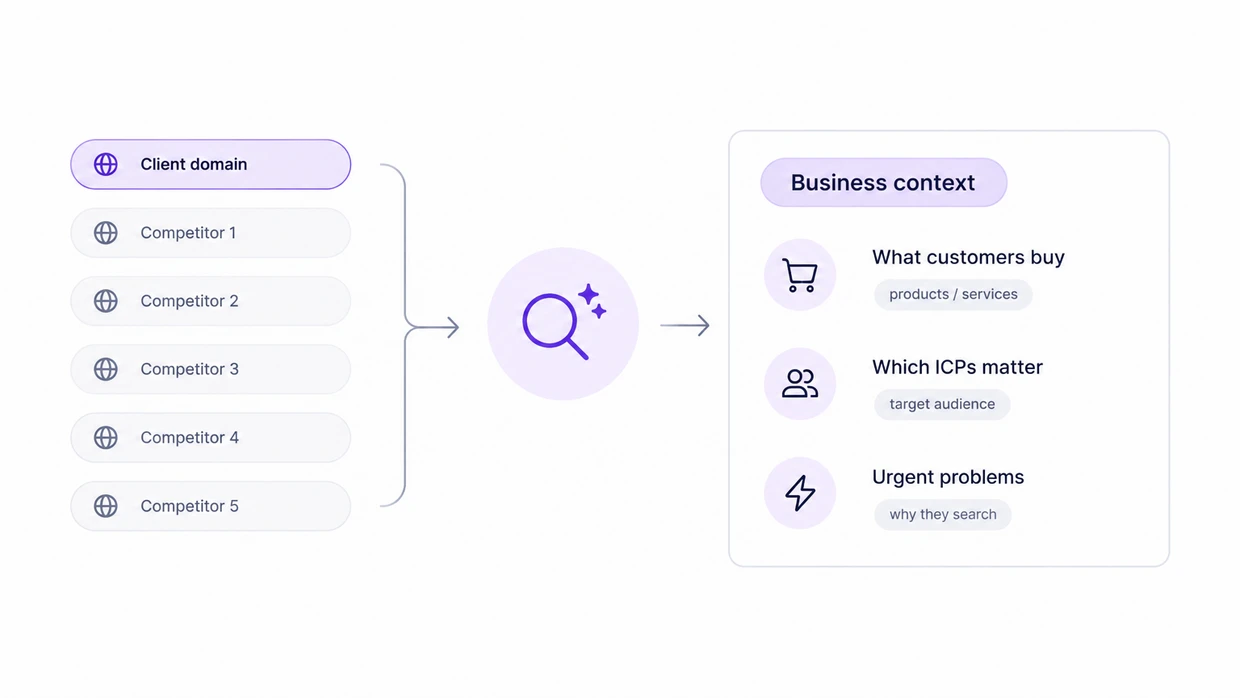
First, read the client domain plus up to five competitor domains and pull out the business context. That means what customers actually buy, which ICPs matter, and the urgent problems that send someone to an assistant.
Second, turn that into bottom-of-funnel commercial topics and validate each against real demand data. Typically that means keyword volume, CPC, difficulty and People Also Ask pulled from Search Console or DataForSEO.
But validation is the step most teams skip. A prompt can read perfectly and still describe a question nobody asks.
Then build the prompt itself. What separates a high-intent prompt from a category question is the constraint:
Bucket + Use-Case + Constraint = High-Intent Prompt
Dmitry Chistov, Amadora AI’s founder, argues the whole set should sit at the bottom of the funnel. His grounds: top- and middle-funnel answers come back without naming any brand. We would soften that slightly. Tag across all three stages so your report can show where the loss sits, then weight the budget toward the decision end.
The Core 15 high-intent prompt set
Fifteen templates across five buckets. Swap the placeholders for your client’s category, brand and competitors. You then have a baseline you can paste into any engine on the roster.
| Bucket | Prompt templates |
|---|---|
| 1. Category discovery | “What are the top {category} for {specific use-case}?” · “Which {category} is best for {audience type} (e.g., SEO agencies)?” · “What are the most recommended {category} right now for reliability?” |
| 2. Comparison | “Compare {brand} vs {competitor 1} for {specific feature}.” · “Compare {brand} vs {competitor 2} for {use-case}.” · “Which is better for {goal}: {brand} or {competitor 1}?” |
| 3. Alternatives | “What are the best alternatives to {brand} for {niche requirement}?” · “What are the best alternatives to {competitor 1}?” · “If I can’t afford {competitor 2}, what are the best similar {category}?” |
| 4. Strategic constraints | “What are the best {category} available under ${budget} per month?” · “Which {category} is best for global teams of {team size}?” · “What are the top {category} that offer {specific compliance/security}?” |
| 5. Integration and evaluation | “Which {category} integrates best with {tool/platform}?” · “What should I look for when evaluating a {category} for {long-term goal}?” · “What should I check before switching from {competitor 1} to {brand}?” |
Keep the swapped wording byte-identical across engines and across runs. A changed word is a changed prompt.
How to tag prompts by funnel stage
Tag every prompt twice: once with its bucket, once with its funnel stage. Funnel-stage tagging is the practice of assigning each tracked prompt to awareness, consideration or decision. Tag them and your report can say which stage is losing, not just that the average moved.
The five buckets already imply the mapping. Write it into your tracker so prompt monitoring carries the stage tag on every row.
| Bucket | Funnel stage | What a drop here means |
|---|---|---|
| Category discovery | Awareness | The brand isn’t in the model’s shortlist for the category at all |
| Comparison | Consideration | It’s known, but losing the head-to-head framing |
| Alternatives | Consideration | Competitors own the “instead of” answer |
| Strategic constraints | Decision | Budget, size or compliance filters are screening it out |
| Integration and evaluation | Decision | Buyers running final checks aren’t finding the evidence |
Take the prompt “What are the best AI visibility tools available under $200 per month?” for a client selling AI visibility software. Bucket: strategic constraints. Funnel stage: decision.
If that prompt goes quiet while category discovery holds steady, the brand is being found and then screened out on price framing. That is a pricing-page and third-party-listing problem, not a content problem.
Why this matters: the fix for an awareness loss and the fix for a decision loss come out of different budgets.
Branded prompts carry a third tag of their own and stay off the funnel scale entirely.
Starter prompt sets by industry
Starter prompt sets change by industry in exactly one place. The five buckets are constant. The constraint that decides the shortlist is not.
We tested the criteria assistants apply before recommending a brand across every engine we track. The criteria came back almost identical.
But what changes them is the prompt and the niche, not the model. A local contractor and a B2B SaaS product return materially different criteria sets. That is the argument for building your starter sets by vertical rather than by engine.
| Vertical | The constraint that decides the shortlist | Two starter prompts |
|---|---|---|
| B2B SaaS | Integration, security posture, seat pricing | “Which {category} integrates with {CRM} and is SOC 2 compliant?” · “What are the best {category} for a team of {n} under ${budget} per month?” |
| Local services | Proximity, licensing, availability | “Who are the best {service} in {city} with emergency availability?” · “Which {service} in {city} is licensed and insured for {specific job}?” |
| Professional services | Specialization, jurisdiction, outcomes | “Which {profession} in {jurisdiction} specializes in {case type}?” · “What should I ask a {profession} before hiring one for {situation}?” |
| Ecommerce | Price band, shipping, return terms | “What are the best {product} under ${budget} with free returns?” · “Which {product} brands ship to {country} within {n} days?” |
| Industrial and manufacturing | Specification, lead time, certification | “Which {equipment} suppliers meet {standard} with lead times under {n} weeks?” · “What are the alternatives to {competitor} for {application} at {spec}?” |
Run the vertical’s constraint through all five buckets and you have a working set in an afternoon. The expanded starter sets by vertical carry the full fifteen per industry.
How often should you refresh a tracked prompt set?
Review quarterly. Change rarely.
Keep the Core 15 stable for at least three to six months. A set that moves every few weeks produces a chart measuring your editing, not your client’s visibility.
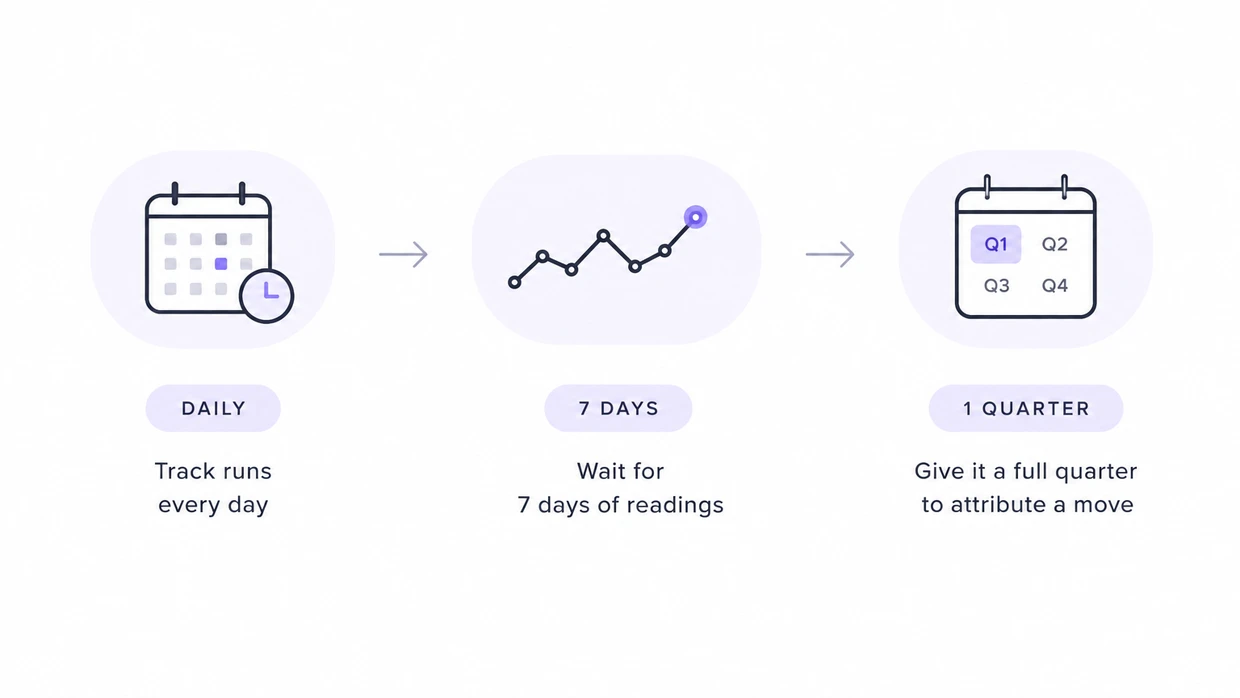
Tracking runs daily. Allow about seven days of readings before you treat anything as a trend. Give it a full quarter before you attribute a move to a specific piece of work.
Your quarterly review is a short agenda. Retire prompts that have sat flat at zero for two quarters running. Add prompts for products your client launched since the last review.
Re-check the engine roster, which moves faster than the prompt set does. Check whether your client now needs multi-engine and multi-geo tracking rather than a single-region set.
What to do when you have to change a prompt mid-quarter
Version the set. Don’t edit it.
A prompt sometimes has to go, because your client sunset the product or the phrasing has aged out. Freeze the current set as v1. Start v2 with the change applied. Report the two separately and let the new trend line start at zero.
The tempting alternative is to swap the prompt and keep the chart running.
But the score after the swap is a percentage of a different denominator. The two periods are not measuring the same thing. Retro-filling the old period with the new set is worse, because it invents readings nobody took.
No dashboard warns you about this. The line just keeps going.
Ready to measure your visibility?
A prompt set is half the instrument. The other half is running it daily across every engine on your roster and reading which sources the answers cite.
Amadora AI does that part: prompt tracking built for agencies. ChatGPT, Perplexity and Gemini run on every plan, alongside the add-on engines listed above, with daily runs across unlimited regions.
Set up a project in about five minutes and load your Core 15. Give it a week before you read the first trend.
Common questions
How many prompts should I start with?
Start with 15 to 20 for a first engagement, scoped to one core topic. The Core 15 gives you that in one paste. Push past 30 only once you know which second topic your client genuinely competes in. The floor of 15 to 20 applies per topic, not per account.
How often should we update the Core 15?
Review it quarterly, and expect most reviews to change nothing. Re-baselining more than once a year is usually a sign the set was scoped wrong, not that the market moved. Every edit costs you the ability to compare this quarter against the last one.
Should we track branded prompts?
Yes, but keep them on their own line. Branded prompts measure existing awareness. Category prompts measure your ability to take new market share. Report both to your client, and put only the unbranded number in the headline.
How do we handle localized AI search?
Duplicate your Core 15 into the local language rather than translating the results afterward. A translated answer is not the same measurement as a locally prompted one. Your English result tells you nothing about the local market. Track each region as its own set.
What do the {category} and {brand} placeholders mean?
They’re variables. Swap them for your client’s own industry category, company name and competitor names before you paste a template into any engine. Write the swapped values down somewhere durable, because you will need the identical strings again next quarter.
How do I tag a prompt that fits two funnel stages?
Pick the later stage. A prompt carrying a constraint such as budget, compliance or team size is a decision prompt, even when it reads like discovery. The constraint is what a buyer adds once they’re choosing. Tagging it earlier understates how close the loss sits to revenue.
Do I need a separate prompt set for each engine?
No. Run one set everywhere and let the engine comparison happen in your reporting, not in the prompt list. Where engines do differ is in the sources they cite. Spend per-engine effort on source targeting, not on rewriting prompts.
Can I reuse one prompt set across two clients in the same category?
Partly. Eight of the Core 15 templates name no brand, so their wording transfers. The other seven carry your client’s own brand and competitors and have to be rebuilt. Even the transferable eight need fresh constraint values, because budget bands and team sizes differ per client.